




Reliable power is easy to overlook until a total station, GNSS receiver or field controller shuts down halfway through a job. The right survey equipment battery helps protect field productivity, reduces avoidable downtime and makes it easier to complete long measurement sessions without interrupting the crew.
This guide explains how to match a battery to your instrument, compare capacity and voltage, select a suitable battery charger, manage batteries in Australian field conditions and recognise when a pack should be replaced.
Quick answer: choose by the exact instrument model and battery part number first. Then confirm voltage, chemistry, physical fit, connector and charger compatibility. A higher capacity may provide more runtime, but capacity alone does not make a battery compatible.
Why the Correct Survey Equipment Battery Matters
Survey instruments depend on stable power for processors, displays, distance measurement, radios, servos and data storage. A battery that is incompatible, damaged or unable to maintain voltage under load can cause unexpected shutdowns and lost field time.
Correct battery selection also makes fleet management simpler. When batteries, chargers and instruments are labelled clearly, crews can prepare complete kits before leaving the office and avoid carrying equipment that cannot be used together.
Five Checks Before Buying a Total Station or GNSS Battery
1. Confirm the Instrument Model
Start with the complete model name shown on the instrument label or in its settings. Similar-looking total stations from the same manufacturer can use different battery packs. Model families may also change battery type between generations.
2. Find the Existing Battery Part Number
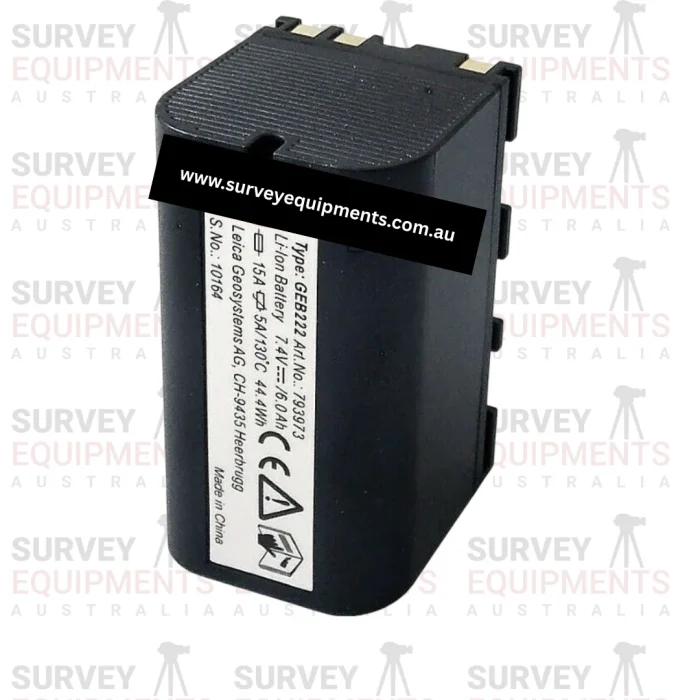
Check the label on the current battery and record the part number. Examples include GEB222 for selected Leica and GeoMax equipment and BDC72 for selected Topcon and Sokkia instruments. Matching the part number is normally more dependable than choosing by appearance.
3. Match Voltage and Chemistry
Voltage must match the instrument’s approved specification. Battery chemistry should also be compatible with the instrument and charger. Do not assume that two packs with similar dimensions are interchangeable simply because both are lithium-ion.
4. Compare Capacity and Watt-Hours
Capacity is usually shown in amp-hours (Ah) or milliamp-hours (mAh). Watt-hours (Wh) combine capacity and voltage and provide another useful way to compare stored energy. Higher capacity can support longer operation when the pack is otherwise fully compatible, although actual runtime depends on the instrument, radio use, temperature, display brightness, battery age and job conditions.
5. Verify the Charger
A compatible battery still needs the correct charging system. Check the charger’s supported battery models, input power, number of charging bays and supplied cables. Never force a pack into a charger or modify contacts to make it fit.
Popular Battery Options for Leica, Topcon and Sokkia Equipment
| Battery | Published specification | Common listed applications | Matching charger option |
|---|---|---|---|
| GEB222 Battery | 7.4V, 6000mAh, 44.4Wh lithium-ion | Selected Leica FlexLine, Builder, Viva, Piper and GeoMax equipment | GKL311 battery charger |
| Topcon BDC72 Battery | 7.2V, 6.0Ah lithium-ion | Selected Sokkia CX and FX total stations and compatible Topcon equipment | Topcon CDC77 dual charger |
Compatibility can vary by instrument version and region. Confirm the battery and charger numbers in the equipment manual or contact us with a photo of the existing label before ordering.
Battery and Charger Compatibility: What to Check
Battery and charger names often look similar, but each model serves a defined group of packs. For example, the Topcon CDC77 dual charger is listed for BDC71 and BDC72 batteries and provides two charging positions. A dual-bay charger can be useful for crews that rotate batteries throughout the day.
For selected Leica battery models, the GKL311 charger is listed for batteries including GEB211, GEB212, GEB221, GEB222, GEB241 and GEB242. Always verify the exact model list before connecting a battery.
How Many Survey Batteries Should a Field Crew Carry?
For routine local work, one working battery and one charged spare per critical instrument is a practical starting point. Remote projects, long shifts, robotic total-station work and jobs using radios or bright displays may justify additional packs.
- Label every battery: add a unique fleet number and purchase date.
- Rotate packs: avoid repeatedly using the same battery while others remain in storage.
- Record weak packs: remove a battery from the field kit when runtime drops sharply.
- Carry the correct charger: check that the power lead and plug are packed with it.
- Protect terminals: use the original cover or a suitable case during transport.
Safer Charging Practices
Follow the instrument and battery manufacturer’s instructions first. The following general practices can help reduce avoidable problems:
- Inspect the battery, cable and charger before use.
- Do not charge a battery that is swollen, cracked, leaking, punctured or unusually hot.
- Use a charger specifically approved or listed for the battery model.
- Charge in a dry, ventilated area away from direct sunlight, flammable materials and vehicle heat.
- Keep charging contacts clean and dry.
- Do not cover the charger while it is operating.
- Stop charging and isolate the equipment if you notice unusual heat, smell, noise, smoke or deformation.
A charger with automatic control and clear status indicators can simplify battery rotation, but it does not remove the need to inspect equipment and follow the operating manual.
Storing Survey Batteries Between Jobs
Heat accelerates battery ageing, so avoid leaving battery packs in a closed vehicle, shipping container or exposed field case. Store them in a cool, dry location where the terminals cannot contact metal tools or other batteries.
For extended storage, follow the battery maker’s recommended state of charge. Many lithium-ion packs are better stored partially charged rather than left completely full or completely flat for long periods. Inspect stored packs regularly and recharge them according to the manufacturer’s instructions.
Managing Batteries in Australian Field Conditions
Hot Weather
Keep spare packs shaded and out of hot vehicles. Allow a battery that has become very hot to return to an appropriate temperature before charging. Never attempt to cool a battery with water or place it in a freezer.
Cold Mornings
Battery runtime can temporarily fall in cold conditions. Keep spare batteries protected from extreme cold and allow the pack to operate within the temperature range specified by its manufacturer.
Dust and Moisture
Keep battery contacts and charging bays clean. Do not insert a wet battery into an instrument or charger. After working in rain or dust, inspect and clean the equipment using the procedure recommended in the instrument manual.
Common Battery Problems and First Checks
The Battery Will Not Charge
Confirm that the charger supports the battery model, check the power outlet and cable, inspect the contacts and test another known-good compatible pack. If the charger or battery becomes unusually hot, disconnect it safely and stop using it.
Runtime Has Become Much Shorter
Short runtime can be caused by age, repeated deep discharge, temperature, increased radio or screen use, poor contact or a failing cell. Compare the pack with another battery under similar conditions. A battery that consistently performs far below the rest of the fleet may be ready for replacement.
The Instrument Shuts Down Under Load
A pack may show charge at rest but fail when the instrument draws more power. Check the battery seating, contacts and model compatibility. Back up important data and test with a known-good battery before assuming the instrument itself is faulty.
The Battery Is Swollen or Damaged
Stop using it. Do not charge, crush, puncture or place it in general waste. Keep people away from any battery that is smoking, hissing or extremely hot and follow emergency-service guidance.
Recycling Survey Equipment Batteries in Australia
Used batteries should not be placed in household rubbish or kerbside recycling because damaged or short-circuited batteries can cause fires during collection and processing. For small, undamaged removable batteries, Australian guidance commonly recommends protecting the terminals with clear adhesive tape and taking the battery to an appropriate recycling point.
Use B-cycle or your local council to find a suitable drop-off location. Damaged, swollen or leaking batteries need different handling, so contact your local community recycling centre or relevant fire and waste authority before transporting them.
Survey Equipment Battery Buying Checklist
- Instrument brand and complete model
- Existing battery part number
- Required voltage and battery chemistry
- Physical connector and locking arrangement
- Capacity or watt-hour requirement
- Compatible charger model
- Number of spares required per crew
- Transport case or terminal protection
- Warranty, condition and package contents
Shop Survey Batteries by Equipment Brand
For faster product discovery, browse Trimble batteries, Topcon batteries and Sokkia batteries. These brand-specific collections help narrow compatible replacement options before checking the exact instrument and battery part number.
Need Help Matching a Battery to Your Instrument?
Survey Equipments Australia supplies batteries, chargers and accessories for a wide range of surveying and geospatial instruments. Browse our survey equipment batteries to compare options by application and compatibility. Browse the GEB222 battery for selected Leica equipment, the BDC72 battery for selected Topcon and Sokkia equipment, and matching charger options.
When you are unsure, send us the instrument model, battery part number and clear photos of both labels through our contact page. Confirming compatibility before ordering is the best way to avoid downtime and unnecessary returns. For the wider field setup around GNSS receivers, controllers, cables, mounts and power accessories, see our GNSS survey accessories Australia guide.
Frequently Asked Questions
Can I Use a Higher-mAh Battery in My Total Station?
A higher-capacity pack may provide more runtime only when it is an approved compatible model with the correct voltage, chemistry, connector and physical fit. Do not choose by mAh alone.
Are GEB222 and BDC72 Batteries Interchangeable?
No. They are different battery families intended for different equipment. Match the battery part number to the instrument documentation.
Can I Use Any Lithium-Ion Charger?
No. Use a charger specifically designed or approved for the battery model. Similar voltage markings do not guarantee that the charging controls, contacts or safety systems are compatible.
How Many Spare Batteries Should a Surveyor Carry?
One charged spare per essential instrument is a sensible minimum for many local jobs. Long shifts, remote locations and high-power robotic or radio work may require more.
When Should a Survey Battery Be Replaced?
Consider replacement when runtime falls significantly, the instrument shuts down under load, charging becomes unreliable or the casing shows damage. Stop using any battery that swells, leaks, cracks or becomes abnormally hot.
Can a Survey Battery Be Left on the Charger Overnight?
Follow the battery and charger manuals. Do not assume every charger is suitable for unattended or extended charging, even when it has automatic controls.
Ready to browse replacement options? Visit our Survey Equipment Batteries Australia hub to shop by equipment brand, or see battery chargers for surveying equipment.
Trimble TSC7 users: see our Trimble TSC7 Australia guide for controller, Trimble Access, GNSS and total station compatibility considerations.


